2D Sprite Art

Week 8 Game Engine Progress

Game Engine Work:

Rabbits spawning in from the same point on the map at startup

I spent a lot of my time this week working on cleaning up my code and optimizing some things in the game engine. I also did a little work with my mob / npc classes. Last week I created a class for a mob spawner, so I decided to put it to use this week and added some rabbits to my game. I implemented the class for the rabbits and then I worked out some basic movement for them. I just wanted them to be peaceful mobs that would occasionally move around for now. In the future obviously I want to be able to interact with them.

Later in the week I worked on implementing the A* pathfinding algorithm to use for mob pathfinding in the game. It seems to work well at this point, but I need to do more tests with the collision system. It seemed to bug sometimes if the player collides with a solid tile. Other than that, I spent my other time working on art for the project.

Game Art Work:

This week I created the art for the first mob in the game the Rabbit. Because my player sprite is 32 pixels I decided that I needed to make the rabbit 16 pixels. I found it very hard to create a 16 pixel sprite and get the details in to make it look like a rabbit. I was happy with the way the up and down animations looked but the side to side animations might need some work. Let me know what you think in the comments. I also need to create idle animations for all my characters so when they stop moving, they are not just standing still.

Rabbit Mob Sprite Sheet

I also started working on some tiles for giving the illusion of height. I modeled the sprites heavily after The Legend of Zelda: A Link to the Past and I will probably add more details to the sprites later. For now, I just needed sprites so I could work out how to procedurally add them to the world generation without causing a lot of bugs.

2D Cliff Tiles
2D Cliff Tiles

Work Planned for the Upcoming Week:

This upcoming week I would like to work on procedurally generating the elevation change tiles into the world. I think it is going to take a lot of work to figure it all out. With a bit of luck, I hope it will be easier than I think. After I figure out terrain height changes, I can work on adding rivers. Then I will need to work out spawning entities like trees through out the world. I will most likely work on some art for new mobs just to break up all the coding this upcoming week. Hopefully after this week the map will start looking more interesting so I can start focusing on gameplay aspects. Until next time.

Week 8 Game Engine Progress Read More »
Week 4 Game Engine Progress

Game Engine Work:

This week I continued working on the random generation of the 2D map for the game. Initially I was working on coding an edge checking system that would take each grid square of the map and determine if it was shallow water. Then it would check each of those grid squares neighbors “left, up, right, down” to determine if it had an edge with sand or not. Once I got those edge cases working for the shallow water and sand edge, I realized I would need to figure out a corner checking system because the map currently is missing edges in some cases. I still have not worked on that problem yet. It will be the next part I work on. The image below shows the corner cases being bugged currently. The program does not know yet to check the corner case and add a different tile to complete the edge.

Edge Corner Bugs
Picture showing the Edge Corner Bugs

From there I also worked on a sand and grass edge check. I was able to get that all set up to the same point as the prior. So, I just need to figure out the corner checks and add the sprites for that. I am confident that I will be able to figure out the corner cases soon and once I have them working, I will most likely move to complete all the edge cases for the different areas on the map.

Game Art Work:

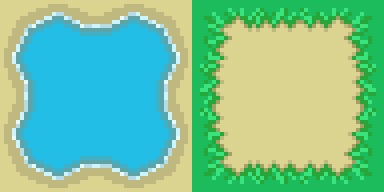
Over the period of the week I worked a lot on trying to create the tile set for the water and sand edge. Each time I thought I was finished it would not line up correctly. I was not sure if I had an issue in my code or the art. It turned out I believe to be the art. After trying so many different looks I just stuck with a very basic one for now. The initial art I worked on had to many bends in it and looked very unnatural, so I scrapped it. I know in the future I want to animate the water and have the water look more like water.

WaterEdge and Grass Edge Tiles
Tile set for the water edge and grass edge

After spending a lot of hours treading water on the art, I decided on focusing on getting the edge in the sprite to line up correctly. So, I worked only on the edges between colors. Most of the tiles are just the solid color from the map with the edge change. Once I had a pattern for the water tile, I created a simple tile set for the grass edge with the sand using the same technique. I am just using these for testing, and I will work more on the art later. I just decided I was spending to much time on the art, and I was not getting anywhere with the actual game work. So, for now I am creating basic art assets to use for testing the code. I can always modify the art later.

Thoughts:

I know this is a relatively short article for this week’s progress but not much progress was made on the game because I spent to much time on the art. I’m looking forward to getting back on track this week. I would like to have all the edge testing done by the end of the week including the corner cases. Then I will need to move into adding rivers, vegetation, and terrain height changes which I anticipate will be harder for me to figure out.

Let me know what you think of the work so far, and if you have any suggestions feel free to leave a comment.

Week 4 Game Engine Progress Read More »
Week 3 Game Engine Progress

Game Engine Work:

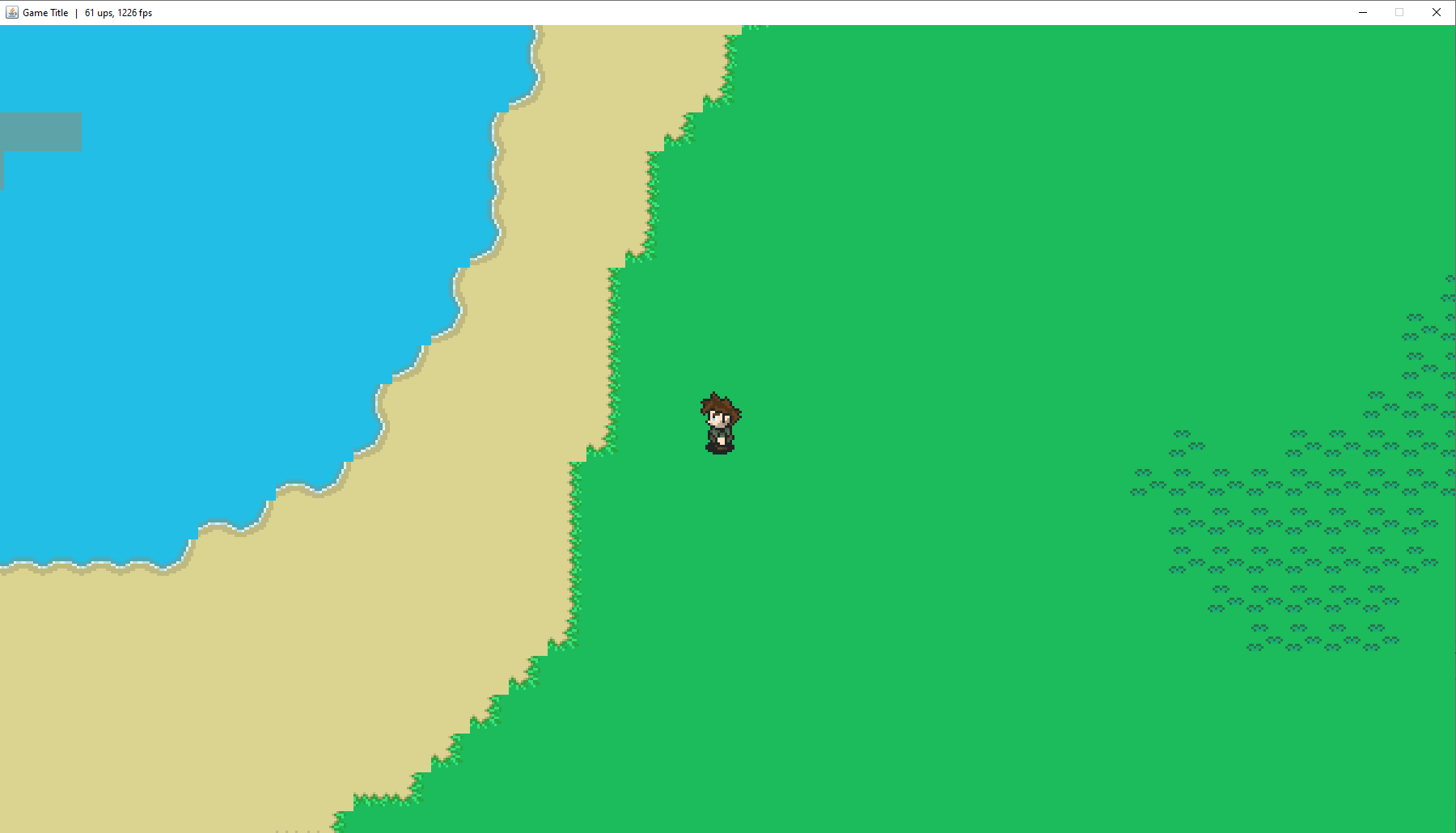
This week I continued working on the generation of the 2D map for the game. I decided for now to take out the moisture map and solely base the map generation on a Perlin noise map of different heights. I set thresholds for areas of water, sand, grass, dense forest, desert, and snow. Most likely I am going to change the desert to mountains or rocky terrain. That way this part of the generation is determining the type of area it is, but not the Biome. For now, the map is not determined by other factors such as how much rain occurs in the area. The moisture map will most likely be needed to determine more Biomes and river generation in the future.

I wanted to simplify the map as much as possible for now so I could work on the edge cases between different types of tiles. I did not want it to just look like squares of color with nothing to break up the edges. You can see what the map currently looks like in the short video above. In the video you can see several of the different terrain types. Including 2 colors of water, sand, grass, and a tile I am currently using to represent a dense forest area. It is just a grass block for now. I decided to have 2 water colors to show the deeper water areas. I may use this for adding fishing to the game in the future. Where certain fish come from only deep water.

In the future I would like the map to have different heights in all the landmass areas. So, I need to figure out a way to randomly generate elevation change in the tiles, so they don’t look out of place. I only want a couple of levels of height, so the map does not look so flat. I will also need to figure out how I am going to handle river generation. Furthermore, I will need to work on adding trees, brush, and other objects like ores to the map. I am going to be looking at Poisson disk sampling to do those parts of the map generation.

Map Generation Next Steps:

The next steps of the map generation, is to figure out how to manage the transitions between the various regions. For instance, between the water and the beach there would need to be a tile in between that has both water and sand to break up the flat look. The same would need to happen for every area that has an edge between two terrain types.

I believe that the following cases would need to be checked for a tile that has two terrain types around it. The lighter tiles would be one terrain type and the darker tiles would be another. The X marks show tiles that we would not care about during each tile check.

Edge Cases Figure
The Figure showing edge cases of tiles

The center tile in each case is the one you are testing to see whether it has neighbors that are not of the same type. The different cases above would need to have art assets for each specific case. From what I have been able to find on the subject I need to have art asset tiles that would look like the image below. So, each case above matches up with the art asset below.

Edge Cases Art Figure
Shows the different art assets that would need to be made for each edge case.

Game Art Work:

This week I worked on coloring the main character sprite. I was trying to make the character look like a ranger. I wanted the outfit to be dark green with leather accents. So, for now I made the clothes a dark green with a brown leather belt. I used a lighter green to highlight some areas. Most likely I will take the black out of the forward-facing hair because it does not fit with the rest of the directions. It just looks funny to me. The main character in the game will probably start out with nothing or just very basic weapons. Currently the character movement is working but I need to create assets for weapons, and assets for different attack animations for the character.

Main Character Sprite Sheet Color
The Colored Main Character Sprite Sheet

I also worked on some water / grass edge tiles. I think it is a good start, but I may need to change them. Once I start working on the edge cases I may decide that these tiles look to detailed for what I am going for. I also started work on the water/ sand edge tiles, but I am not done with them yet. This week I am going to try and focus on finishing the edge tiles and getting all the basic tiles done so the map can start looking like something.

Water Edge Tiles So Far
Water Edge tiles done so far

Week 3 Game Engine Progress Read More »

Week 2 Game Engine Progress

Running Right Sprite Sheet Animation

Game Engine Work:

I believe that this week I made some good strides towards setting up the basic game engine for my game. I started to program the basic setup for rendering tiles and being able to move around the randomly generated map. Also, I worked on only rendering the tiles that are visible on the screen, for optimization purposes. The last part that I completed this week was creating a void tile. So, if there is no tile in that location or it is the edge of the world it would render a void tile (currently a black tile).

The next step in the programming is to setup entities like the player and mob class. Currently I have movement working but I have not implemented the player sprite in the game or its animation. That is most likely the next step. I also need to create more tiles for the game. Currently I just have it randomly generating a 64 tile by 64 tile map for testing. But it is not taking the randomization data from the Perlin noise algorithms that I worked out in a separate program. Another major piece of work in the coming week will be getting the Perlin noise data and using that to determine which tile to load.

Game Art Work:

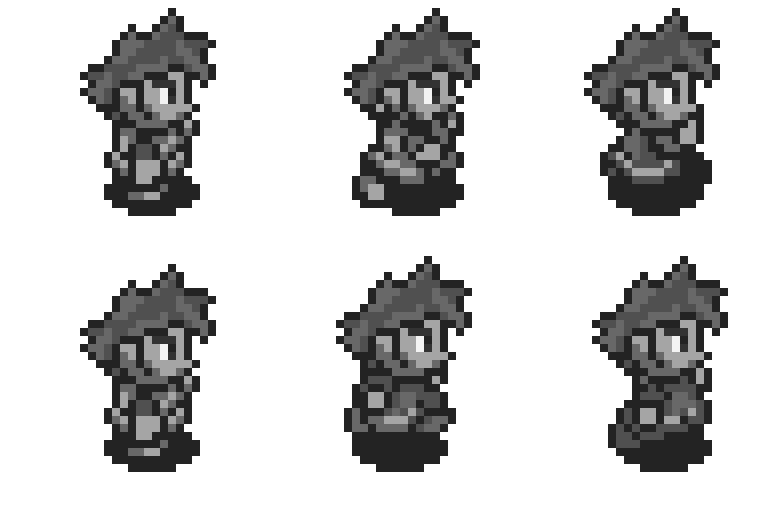
For the artwork this week I am going to continue working on my main character art. This week I completed the gray scale art for the player sprite for each direction. I probably need to create an idle animation as well. Also in the future I will need to create sprites for attack animations and others. But all that work will be done down the road. This week I want to try and finish coloring the main character sprite sheet. Besides the main character art, I also worked on a basic slime mob character this week. Currently I may not use any of the art, but I need something to render for engine testing. So, for now the slime mob can be a good test for programming the enemies and enemy movement. Once I am happy with that, I can move on to creating other enemies.

Main Character Sprite Sheet so far
Slime Enemy Sprite Sheet so far

Project Scope Thoughts:

This week most of the time that I could spend working on the game was just for getting the game engine started. I spent a lot of time working on getting the tiles to render properly and being able to move around the map without any crashing. Since I am coding the entire engine for the game this project will take much longer to complete.

I’m working on this to learn and get better at game programming and game development in general. I look forward to the day that I can look back at where this project started and how far it has come. Currently I don’t have any timeline for completion on this project as there are a lot of things that I want to implement. I think I will take a lot of inspiration from games that I enjoyed playing like Dwarf Fortress, Minecraft, Stardew Valley, The Legend of Zelda: A Link to the Past, and Legend of the River King just to name a few. I probably have to many ideas for what I want to do with this game and as I move forward, I will likely cut down the scope to make the project something that I can complete within a reasonable amount of time. My goal is to get a simple but working prototype done first and then add more and more systems to the game over time.

Week 2 Game Engine Progress Read More »